All applications are configured from the connector_config.h header file, found within the project's Source folder. In this file, you must define some macros to configure the example.
The CONNECTOR_MAC_ADDRESS macro configures the device’s MAC. This macro must be defined using the following format and order:
#define CONNECTOR_MAC_ADDRESS {0x00, 0x04, 0x9F, 0x01, 0xA0, 0x6F}
If the macro is not defined, the application will ask for it through the serial port.
The Cloud Connector thread reads the MAC address from the TCP stack to create the Device ID. A Device ID is a 16-byte address that uniquely identifies a device within Device Cloud.
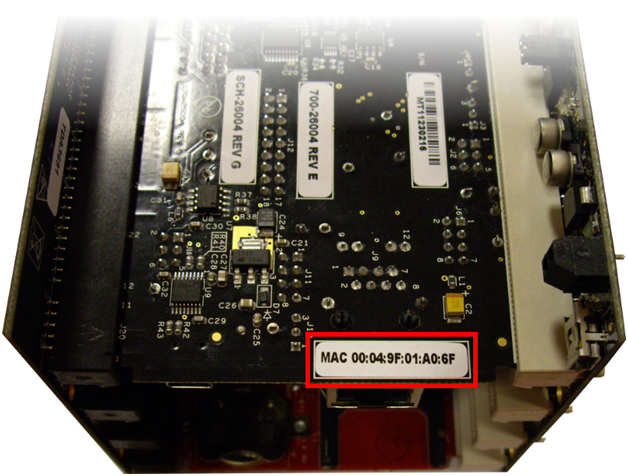
You can locate your device's MAC address via the sticker located on the bottom of the TWR-SER device (as highlighted in the image below):
This parameter depends on your Device Cloud account. A Vendor ID is a unique 32-bit code identifying the manufacturer of a device. The CONNECTOR_VENDOR_ID macro must be defined as follows:
#define CONNECTOR_VENDOR_ID 0x12345678
If this macro is not defined, the application will ask for it through the serial port.
The macro CONNECTOR_CLOUD_URL specifies which Device Cloud your application will connect to. This macro must be defined as follows:
#define CONNECTOR_CLOUD_URL "login.etherios.com"
If this macro is not defined, the application will ask for it through the serial port.
By default, Cloud Connector applications will try to get their IP address from a DHCP server. If you want to manually specify a static IP configuration, define the following macros at connector_config.h:
#define CONNECTOR_USE_STATIC_IP
#define CONNECTOR_DEVICE_IPADDR IPADDR(192,168,1,2)
#define CONNECTOR_DEVICE_IPMASK IPADDR(255,255,255,0)
#define CONNECTOR_DEVICE_GATEWAY IPADDR(192,168,1,1)
#define CONNECTOR_DNS_SERVER_IPADDR IPADDR(8,8,8,8)
This macro defines the name that the application reports to Device Cloud. This name is displayed in the Device Type column of the Devices page:

To change the device type displayed, modify the following macro:
#define CONNECTOR_DEVICE_TYPE “MQX 4.0 on Kinetis”
Remote configuration is an optional service for applications to exchange device configuration data and information between the device and Device Cloud. This is a very complex interface, so it is recommended that you test the example.
To enable this service, the following macro must be defined at connector_config.h:
#define CONNECTOR_RCI_SERVICE
Also, the CONNECTOR_RCI_MAXIMUM_CONTENT_LENGTH macro must be declared with the maximum content length in bytes of an element’s value. This macro is used in buffer allocation so you should reduce its value to reduce RAM usage:
#define CONNECTOR_RCI_MAXIMUM_CONTENT_LENGTH 256
The Data Service feature is used to send data to and from Device Cloud. Data Service transfers are either initiated from Device Cloud (Device Request) or from the device itself (Send data). To enable this feature, the following macro must be defined at connector_config.h:
#define CONNECTOR_DATA_SERVICE
The following macro must also be defined if this feature is enabled. It affects the way the Data Service and File System features behave by limiting the maximum transactions at the same time:
#define CONNECTOR_MSG_MAX_TRANSACTION 1
Data Points for Devices is used to send data points to Device Cloud. It can be used to send simple data in binary form, or to send multiple points of a stream in a message. To enable this feature, the following macro must be defined at connector_config.h:
#define CONNECTOR_DATA_POINTS
To enable this feature, the following macro must be defined:
#define CONNECTOR_FIRMWARE_SERVICE
For all supported Towers, there is an example that enables this feature but does not modify the firmware (“stub example”). To enable this feature the following macro must be defined:
#define APPLICATION_FIRMWARE_SERVICE_STUB
For TWRK60N512 there is a full implementation, see Firmware Update for more information.
To enable MFS File System support in any example, you must define the following macros:
#define CONNECTOR_FILE_SYSTEM
The following macro must also be defined if this feature is enabled. It affects the way the Data Service and File System features behave by limiting the maximum transactions at the same time (but define only once):
#define CONNECTOR_MSG_MAX_TRANSACTION 1
The maximum path length must be defined using the following macro (change it to save RAM):
#define CONNECTOR_FILE_SYSTEM_MAX_PATH_LENGTH 256
Cloud Connector includes support for two file system devices. To test this functionality, define only one of the following macros:
#define FILE_SYSTEM_USB
#define FILE_SYSTEM_SDCARD
As their name states, FILE_SYSTEM_USB adds support for USB sticks and FILE_SYSTEM_SDCARD adds support for SD Cards. Please note that only one device per application is supported.